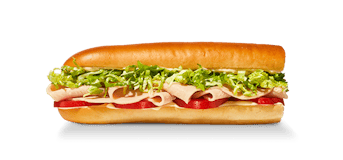
The Turkey Tom has 471 calories for the listed 8-inch sandwich in this site’s nutrition snapshot. The Little John record has 240 calories, and the 16-inch record has 943. If you have seen more than one answer to the same calorie question, the first thing to check is the serving beside the name. “Turkey Tom” on its own leaves out a detail that changes the total considerably.
Those figures describe the supplied sandwich records, before you add a separate side or drink. They also describe the recipes in our dated dataset. They are a useful starting point for comparing an order, rather than a measurement of the sandwich a particular store has just made.
Match the name to the size
The three Turkey Tom entries belong to the same named sandwich family, but the calculator treats each as its own serving. It does not turn a Little John into an 8-inch sandwich with a length multiplier, and it does not create the larger sandwich by doubling the regular entry. That matters even when two figures look almost proportional.
| Listed Turkey Tom serving | Calories | Protein | Sodium |
|---|---|---|---|
| Little John | 240 | 12 g | 583 mg |
| 8-inch | 471 | 24 g | 1,155 mg |
| 16-inch | 943 | 48 g | 2,310 mg |
Read across one row before comparing it with another. Protein is in grams, while sodium is in milligrams. Neither number is an extra serving or something to add to the calorie column. The table is a description of each listed sandwich, so choosing the size comes before deciding how many sandwiches to count.
The menu directory helps when you recognize the product picture or sandwich name but are unsure which calculator entry to use. Follow its serving preview and read the size before confirming the addition. A calorie range on a menu card can cover several choices; the meal total needs one specific record.
An 8-inch sandwich with chips is a different calculation
A regular bag of chips contributes 300 calories and 3 grams of protein in the same dataset. Add that bag to the 8-inch Turkey Tom and the meal reaches 771 calories and 27 grams of protein. The sandwich remains 471 calories. The larger total comes from adding another item, rather than revising the sandwich’s value.
This is an easy distinction to lose when a receipt, a food-tracking search result and a restaurant menu all use slightly different labels. One entry might refer to the sandwich; another might refer to a meal. Before replacing a saved food entry with a different number, check whether the second number includes the side you were about to log separately.
You can open the 8-inch Turkey Tom in the calculator, confirm the serving and add your chosen side. Look at the item names in the meal summary as well as the total. If you added the sandwich twice while exploring the menu, the quantity beside it will explain an unexpectedly large result more quickly than checking every nutrient field.
A smaller sandwich does not automatically mean a smaller order
The Little John gives you a smaller starting point, but the rest of the order still counts. A Little John Turkey Tom plus a regular bag of chips totals 540 calories. That is 69 calories more than the 8-inch Turkey Tom by itself, even though the sandwich in the first order is smaller.
There is no contradiction there. You are comparing a sandwich and a bag with a sandwich alone. To compare portion choices fairly, hold the extras steady. Put the same side with both sizes, or compare both sandwiches without a side. Once you decide which lunch you actually want, build that complete order rather than choosing from the sandwich column alone.
Two Little John Turkey Toms provide another useful example. Their source totals add to 480 calories and 24 grams of protein. The 8-inch record is 471 calories and also lists 24 grams of protein. Similar totals do not make the orders interchangeable: they remain different servings, and the matching protein figure does not establish identical recipes or preparation.
Use the 16-inch entry when that is what you ordered
The listed 16-inch Turkey Tom has 943 calories. Two copies of the 8-inch record add to 942. A difference that small is not a reason to edit either source value. It is a reason to select the actual serving rather than making a substitute record from arithmetic.
For an order containing one larger sandwich, add the larger sandwich once. For two regular sandwiches, add the regular entry twice. This keeps the meal summary consistent with the food you ordered and preserves the source’s other nutrient values. It also makes a copied summary much easier to understand later, when you no longer have the receipt in front of you.
If you share a larger sandwich, distinguish the full purchased item from the portion you ate. The calculator’s quantity controls count complete listed servings; they are not a scale. You can use arithmetic separately for a known share, but cutting a sandwich visually does not establish that each piece contains exactly the same amount of every filling.
What a customization request leaves unresolved
An instruction such as “no mayo” describes a different preparation from a standard supplied record. Our Turkey Tom entries do not include a verified ingredient-by-ingredient subtraction for that request. The same limitation applies to changing the bread, removing some filling or adding an extra portion that has no separate matching source entry here.
Avoid taking a deduction from an unrelated sandwich or an old food-tracking entry and treating it as a measured adjustment. A standalone side and an ingredient portion inside a sandwich can have different serving definitions. For a customized order, check the restaurant’s current information for that exact preparation and keep the standard figure identified as a comparison point.
The nutrition table and source notes are useful for checking the rest of the record, including fat, carbohydrates and sodium. Start with the right Turkey Tom size, add the items you will eat, and keep any unresolved customization separate from the figures the dataset can actually support.