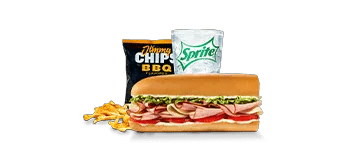
There is no single calorie number for every Jimmy John’s combo. The total depends on the main item, its serving, the side and the drink. On this site, the example Original Combo has 891 calories because it uses an 8-inch Pepe, regular chips and a zero-calorie default drink. That is one stated combination, not the value of every sandwich-and-side order sold under a combo label.
Before using a combo figure, check what is inside it. This matters more than whether the meal’s title looks familiar. A correct total for one set of components can still be the wrong entry for your actual lunch, particularly if you choose a different sandwich or replace the default drink.
Three ways a meal can appear in the calculator
A named meal record identifies a particular main item and its stated components. The Pepe meal-deal entry here is calculated from the 8-inch Pepe, Regular Jimmy Chips and a zero-calorie drink assumption. Its 891-calorie total is already combined. It does not need the sandwich adding a second time.
A broader combo entry uses an example main item to make the calculation possible. The Original Combo uses the Pepe as that default, while the Wrap Combo uses Chicken Caesar Wrap. Their details identify those choices. An example is useful for understanding a meal, but it cannot stand in for every alternative a restaurant’s ordering menu may offer.
The third option is to assemble the order from individual items. This is often the clearest choice when your actual sandwich, side or drink differs from the stated example. The item list then shows the foods you chose directly, instead of requiring you to remember which default sits inside a broader combo name.
| Example used on this site | Main item | Side | Drink assumption | Calories |
|---|---|---|---|---|
| Original Combo | 8-inch Pepe | Regular Chips | Zero-calorie default | 891 |
| Wrap Combo | Chicken Caesar Wrap | Regular Chips | Zero-calorie default | 1,189 |
The 298-calorie gap between these examples comes from their different main items. It does not mean every wrap combo has that exact gap from every Original combo. Keeping the named components visible lets you see what the comparison actually establishes, without turning a category label into a universal meal value.
Work through the Original example once
The listed 8-inch Pepe contributes 591 calories and regular chips contribute 300. Add the zero-calorie default assumption and the example reaches 891 calories. Its stated protein total is 33 grams. The combined entry is a convenient presentation of those particular components, rather than a new standalone sandwich recipe.
If those foods match your intended order, you can open the Original Combo preview and read the details before confirming it. Pay attention to the default main item. The broader name does not automatically update the meal to a different sandwich you happen to be thinking about.
For a different main, remove the combined entry and assemble the actual individual items instead. This makes the change visible and avoids having to make a subtraction from a composite whose other assumptions you might overlook. It also produces a clearer copied summary if you want to keep a record of the order.
The most common duplicate is an included side
Suppose you add the example Original Combo, then add regular chips because you know your lunch includes a bag. The tool now has 1,191 calories: the 891-calorie combined entry plus another 300-calorie bag. That total is appropriate only if you intend to count a second bag on top of the one already included.
Adding the Pepe separately would cause a similar problem with the sandwich. The original entry already contains it. A meal summary that lists both a combined item and one of its components deserves a quick check before you rely on the result. The extra entry may be intentional, but it should be a decision rather than an accident.
The menu directory helps you distinguish prepared items from broader meals before you start calculating. In the calculator, expand the component details of a combo whenever you are unsure. You do not need to know the site’s internal data structure; you only need to see whether the food is already part of the item you selected.
Changing a drink can change more than the calorie display
The independently listed Coke entry has 280 calories. Build an order from the 8-inch Pepe, regular chips and that drink, and the known calorie total becomes 1,171. That calculation uses the specific drink card in this snapshot. It does not establish the calories in every cup size or every possible refill.
The drink card supplies calories without full macro information. As a result, the calculator cannot show a complete protein, carbohydrate or fat total for that assembled meal. This does not mean the sandwich’s protein has disappeared. It means the site lacks enough information to label the sum as complete across every selected item.
Diet Coke provides a useful second example. Its card lists zero calories, so adding it to the individually selected Pepe and chips keeps the calorie total at 891. Its macro fields are still unavailable in this dataset. Known zero calories and fully supplied nutrient fields are different facts, and the display preserves that distinction.
The zero-calorie default inside an example combo is a documented calculation assumption. It is not the same thing as selecting a fully measured branded drink. If you want the summary to reflect an actual separately listed drink, assemble the individual items and accept any missing fields rather than treating the example’s assumed zeros as newly verified beverage information.
Make the meal description specific enough to check
A useful saved meal name should identify the main serving and the extras, even if the restaurant calls the purchase a combo. That short description will help you recognize a mismatch later. “Combo” alone leaves too many questions open, while a complete item list explains both the total and any missing information.
Review the nutrition and source notes if a menu range and a calculator total appear to disagree. They may describe different selections or data scopes. For this tool, a reliable comparison starts with explicit contents: choose the stated combination when it matches, or add your actual items individually when it does not.