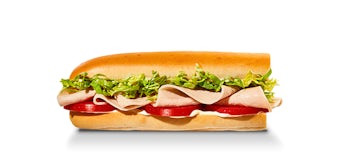
A Little John and a Slim are different menu choices. In the supplied catalogue, Little John is a smaller sandwich size, while Plain Slims is a category with its own named sandwiches and larger serving options. Ordering a Slim does not specify the smallest sandwich. Choosing a Little John does not mean you have chosen the plain version of a regular sandwich.
The names can suggest otherwise, especially when you are scanning a menu quickly. “Little” sounds like a portion description, which is helpful. “Slim” can sound like a second portion description or a promise about calories, which is less helpful. Looking at an actual pair of entries makes the distinction much clearer than trying to interpret those words alone.
Start with the turkey example
Our snapshot lists a Little John Turkey Tom at 240 calories and 12 grams of protein. The 8-inch Slim 4, named Turkey, has 412 calories and 27 grams of protein. They both point toward a turkey sandwich, but they do not describe the same serving. Substituting one for the other in a food log would change both the calorie total and the protein total.
The 8-inch Turkey Tom is another separate entry, with 471 calories and 24 grams of protein. Notice that the 8-inch Slim 4 has fewer listed calories than that regular Turkey Tom, but more listed protein. The relationship is specific to those records. It does not mean every plain sandwich has the same deduction, or that a Little John can be converted into a Slim by removing a fixed number of calories.
| Sandwich record | Listed serving | Calories | Protein |
|---|---|---|---|
| Turkey Tom Little John | Little John | 240 | 12 g |
| Slim 4 — Turkey | 8-inch | 412 | 27 g |
| Turkey Tom | 8-inch | 471 | 24 g |
| Slim 4 — Turkey | 16-inch | 825 | 55 g |
For someone deciding between a smaller sandwich and a plain regular-size sandwich, the first two rows answer the immediate question. The remaining rows show why the category and serving still need to travel together. There is a larger Slim 4 record too; the word Slim has not fixed its length or its nutrition total.
The sandwich number is only part of the name
A number can help identify a sandwich family without identifying the complete item. The catalogue includes a Little John Pepe and a Slim 1 named Ham & Provolone. It is tempting to save a short label such as “number one” and assume the rest will be obvious later. That label omits the distinction you were trying to preserve.
For these two records, the Little John Pepe has 300 calories and 15 grams of protein. The 8-inch Slim 1 has 532 calories and 33 grams of protein. The difference is 232 calories, but that does not give you a reusable “Slim adjustment.” You changed the specific serving and sandwich record, rather than adding one known ingredient to the same base.
Write down the category, sandwich name and size when you keep a meal record. “Slim 1, 8-inch” is much easier to match than “small ham sandwich.” The same habit helps with a group order: an item that is recognizable to the person ordering may still be ambiguous to someone adding up the food afterward.
Decide which question you are asking
If you want a smaller supplied portion, compare the Little John entry with the regular entry for the same named sandwich. If you want a plain sandwich, compare the relevant Slim entry with the other sandwich you are considering at the same listed length. These are different comparisons, and neither requires describing one option as universally better.
A calorie total alone also cannot tell you which portion will suit your appetite. The table can describe the food, but it cannot predict how much lunch you need or whether you will want another item afterward. Choose the portion you mean to eat, then review that whole order instead of treating the smallest number as a complete answer.
Use the menu’s category filter to separate Little Johns from Plain Slims before you browse. This removes an unnecessary layer of name matching. Once you find the item, check the serving preview: a similar image or the same sandwich number is not enough to identify its nutrition record.
Keep the comparison steady when you add the rest of lunch
Suppose you first compare a Little John alone with a Slim alone, then decide to add a side to only one of them. You have changed the question from “which sandwich?” to “which complete order?” Both comparisons are useful, but the answer to the first does not automatically carry over to the second.
The practical way to handle this is to build one order completely, note its contents, then build the alternative with the same extras. If the extras are deliberately different, leave them different and compare the actual totals. What matters is being able to explain the difference, rather than making the two orders look artificially alike.
The Slim 4 calculator entry gives you a direct starting point for that comparison. Confirm the 8-inch serving, then add the other items you intend to eat. The quantity label on its menu card refers to complete copies of that serving; it does not switch the item to Little John or turn one regular sandwich into a larger one.
Check preparation details separately
Plain Slims identifies the category in this dataset. It does not authorize us to invent every ingredient substitution a store might allow today. For a special request, describe the exact preparation to the restaurant and check its current information. Do not assume that adding toppings to one item will reproduce another item’s published nutrition.
Similarly, the shorter Little John record is not a measured fraction of every larger sandwich. Its supplied name includes a size description, but the nutrition remains a separate source entry. Using length alone to estimate the filling or protein would go beyond what that record establishes.
When the menu language still feels unclear, open the nutrition table and compare complete names side by side. A useful saved entry keeps these details together:
- Sandwich: Turkey Tom, Slim 4 or the other named product you chose.
- Category: Little Johns, Plain Slims or Originals, as shown in the catalogue.
- Serving: the specific size attached to that item, rather than an assumed “small.”
Those labels make it possible to recognize the same order later without guessing what “a turkey sandwich” meant when you saved it.