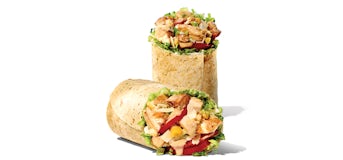
The Chicken Caesar Wrap lists 889 calories and 36 grams of protein for one wrap in our nutrition snapshot. That number covers the complete listed item. It is not a figure for one cut piece, a tortilla alone or an order with chips. Establishing that unit first makes the rest of the calculation much easier.
A wrap can look like a compact lunch, particularly when it arrives cut and wrapped in paper. Its appearance does not tell you how its calories compare with a sandwich or another wrap. For this question, use the complete product name and the serving marked “Wrap,” then add whatever else will be in the order.
What the 889-calorie figure includes
The figure belongs to the prepared Chicken Caesar Wrap described by the source entry. Its other listed values include 50 grams of fat, 74 grams of carbohydrates and 2,383 milligrams of sodium. These are totals for that same serving, rather than optional ingredients that need adding to the calorie count.
You do not need to reconstruct the wrap from separate chicken, bread and dressing estimates to use this entry. Doing that would introduce new serving assumptions while discarding the prepared-item figure you already have. A generic chicken portion or a tortilla from another product is unlikely to identify the exact preparation represented here.
The Chicken Caesar Wrap calculator preview shows the serving before you confirm it. Once added, one unit means one complete listed wrap. If the summary shows two units, it is counting two wraps, even if you had been thinking about the two pieces of a single wrap cut for serving.
Cut pieces and whole servings
A cut does not create another wrap. If one purchased wrap is divided into pieces and you eat all of them, the listed total still applies once. Counting each piece as a complete wrap would double the entry without adding any food. This is an easy mistake when a tracking app asks for a number of “servings” without making its unit clear.
For an evenly divided half, half of the listed figures is 444.5 calories and 18 grams of protein as arithmetic. That describes a theoretical half of the nutrition total, not a measurement of one visible piece. Fillings are not guaranteed to be distributed exactly evenly, and an uneven cut is not necessarily an equal portion.
The calculator uses complete-item quantities, so its plus button is not a half-wrap control. If you are logging only part of a wrap elsewhere, keep the original full-serving figure attached to your separate portion estimate. This is more transparent than saving the partial amount under an unlabeled “Chicken Caesar Wrap” entry that you might mistake for the full item next time.
Compare the named wraps rather than the word “wrap”
The four wrap records below differ in calories and protein. They share a serving category, but their names identify different prepared products. There is no single wrap calorie value you can safely apply to all of them, and the presence of chicken in a name does not make two recipes nutritionally identical.
| Listed wrap | Calories | Protein |
|---|---|---|
| Thai Chicken Wrap | 725 | 29 g |
| Kickin’ Ranch Chicken Wrap | 807 | 36 g |
| Tuscan Italian Wrap | 861 | 44 g |
| Chicken Caesar Wrap | 889 | 36 g |
For the Chicken Caesar and Kickin’ Ranch Chicken pair, the calorie difference is 82 while the listed protein is the same. For the Chicken Caesar and Tuscan Italian pair, the Tuscan entry has 28 fewer calories and 8 more grams of protein. Those are specific comparisons between the rows, without making a broader claim about which lunch is best.
The Thai Chicken entry is 164 calories below the Chicken Caesar entry, with 7 fewer grams of protein. If you are weighing those options, consider which comparison matters to you and whether you actually want both products. A smaller calorie number does not make a different flavor, filling or preparation an interchangeable meal.
A wrap with chips is a larger total
One regular bag of chips adds 300 calories and 3 grams of protein. Combined with the Chicken Caesar Wrap, that makes 1,189 calories and 39 grams of protein before adding any separate drink. If you were expecting the wrap figure to describe the entire bag of lunch, this is the point where the estimate can otherwise go wrong.
There are two clean ways to represent that order: choose the individually listed wrap and side, or use a composite whose stated components match the purchase. Do not use both for the same food. A composite is already a combined amount, so adding its included wrap again would count that part of lunch twice.
Sides are also worth comparing on their own terms. If you change the side while keeping the wrap, the wrap’s 889-calorie entry stays the same. The new total comes from the replacement item. Keeping that distinction visible lets you explore an order without accidentally treating a meal total as a revised sandwich or wrap value.
You can browse the available products in the menu directory before making the calculation. Read the listed side serving carefully as well as the wrap name. A bag, a separate sauce portion and another prepared side are not interchangeable units just because they all appear beside the main item on a menu.
When your wrap is customized
The standard entry cannot provide an exact value for every request to remove, replace or reduce an ingredient. In particular, this dataset does not offer a verified ingredient deduction that turns the Chicken Caesar Wrap into every possible lighter preparation. A precise result built from an unverified deduction would hide uncertainty instead of resolving it.
For a special preparation, check the restaurant’s current information for that named order. Keep it separate from the standard entry, especially if another online figure refers to a different recipe or source date. Our nutrition and source page explains the scope of the figures used here. For a standard wrap order, the working sequence stays straightforward: count the whole wrap once, add the actual extras, and check what the meal summary includes.